What is done on the Screening Questions Page?
On the Screening questions page, you can see an overview of all the questions available to you:
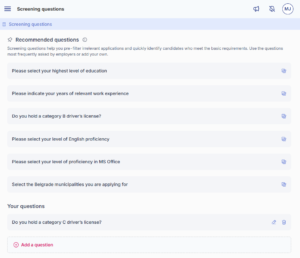
This is what the Screening questions page looks like – frequently used questions are at the top, and your saved questions appear below.
Recommended questions – these appear in more than 80% of job ads that include screening questions on the HR Lab platform. We’ve added them to help you filter applications faster and streamline your selection process.
Your questions – questions you’ve created and saved for reuse. You can use them again when posting new job ads.
On this page you can:
- Add a new question and save it for future job ads
- Edit an existing question
- Delete your created questions (recommended questions cannot be deleted).
By using this page, you save time, since the questions are immediately available when creating a new job ad.
Tip: Create your own questions in advance – they will be available to all members of your account when posting job ads.
Was this information useful?